You know when a model version is about to be deprecated, or you need to switch to another provider's model, and that means adjusting your prompts to make them work? One of DSPy's purposes is to help with that pain point.
The problem DSPy solves#
Most LLM applications today rely on manual prompt engineering. You write a long string, test it, change a word, test again, add one or more examples, pray, and keep adjusting until it works. Until the model version changes, you switch providers, or the use case grows beyond the scenarios you tested.
DSPy (dspy.ai) proposes a change: instead of writing prompts, you program declarative modules and let the framework compile optimized prompts automatically, based on data, metrics, and the model you are using.
The analogy the Stanford NLP team itself uses: DSPy is to LLMs what PyTorch is to neural networks. You define the architecture (modules), define the loss (metric), and the compiler (optimizer) finds the best weights, which for LLMs are instructions and few-shot examples.
Who created it and where to find it#
DSPy originated in the Stanford NLP Lab in February 2022, evolved from the DSP (Demonstrate-Search-Predict) project, and took its current form in October 2023. The official documentation is at dspy.ai, the source code at github.com/stanfordnlp/dspy, and the community is active on Discord.
The framework is open source, has more than 250 contributors, and has already inspired a series of academic papers and derivative tools. If you work with LLM pipelines in production, it is worth spending time understanding the concepts, even if you do not adopt the entire framework.
The 4 fundamental concepts#
1. Signatures: the I/O contract#
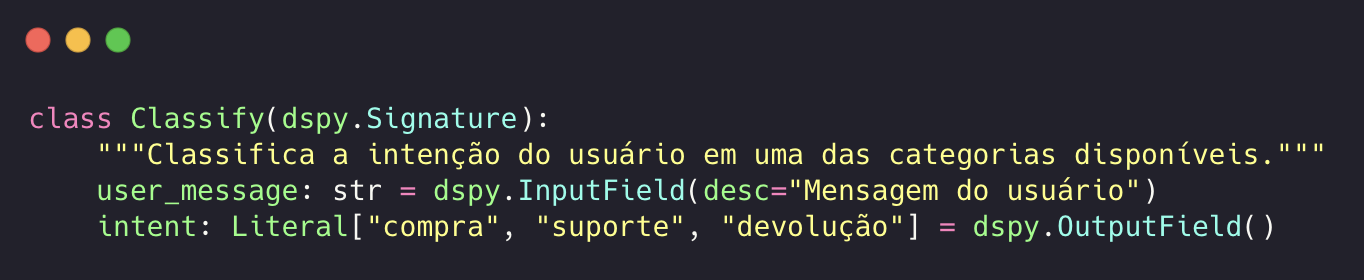
A Signature defines what the module does, not how. It is the declarative interface between your code and the LLM.
In its simplest form:
"question → answer"Or with types and descriptions:
 Enlarge ↗
The key point: you do not write the prompt. The Signature describes the contract, and DSPy builds the prompt automatically, including instructions, formatting, and few-shot examples if compiled.
The Signature's docstring matters more than it seems. It becomes part of the prompt sent to the LLM. Explicit rules there directly influence classification.
2. Modules: the execution strategy#
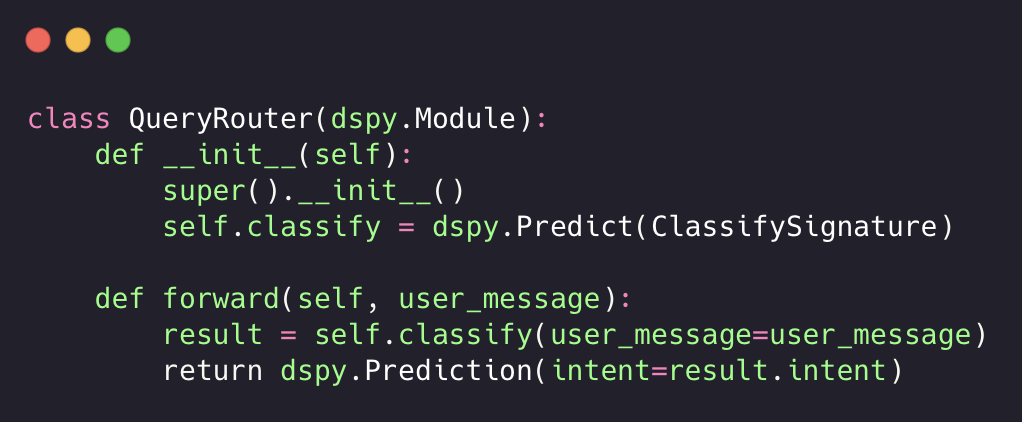
Modules define how the LLM should process the Signature. The main ones:
dspy.Predict: a direct call, without intermediate reasoning;dspy.ChainOfThought: forces the model to reason step by step before answering;dspy.ReAct: an agent that can use tools (search, code, APIs) in a loop;dspy.Retrieve: vector database search integrated into the pipeline.
You compose modules in ordinary Python classes:
 Enlarge ↗
This is code. Testable, debuggable, versionable. It is not a string with more than 200 lines pasted into a template.
3. Optimizers: the prompt compiler#
This is where DSPy differs radically. Optimizers (formerly called Teleprompters) compile your program by automatically generating the best instructions and few-shot examples for each module.
The main ones:
BootstrapFewShot: uses your own program as a teacher. It runs training-set examples, validates them with your metric, and keeps those that pass as few-shot demos in the compiled prompt;BootstrapFewShotWithRandomSearch: like the previous one, but tests multiple combinations of demos and selects the best on the validation set;MIPROv2: is the most sophisticated. It generates instructions and few-shot examples together, using Bayesian Optimization to search for the best combination. It is data-aware and demonstration-aware;COPRO: focuses exclusively on optimizing instructions (without few-shot), using hill-climbing;BootstrapFinetune: goes beyond the prompt: it generates datasets and fine-tunes the model weights.
In practice, the flow is:
 Enlarge ↗
Once compiled, the module loads the JSON and uses the optimized demos on every call. No recompilation for every request.
4. Metrics: the loss function#
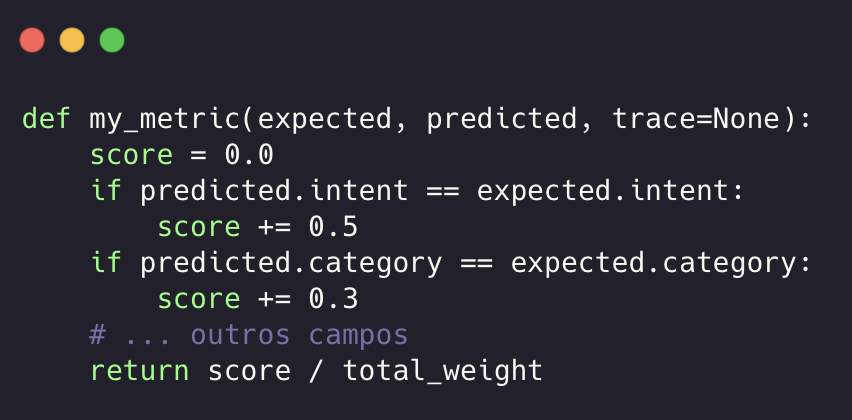
For the optimizer to work, you need a metric that says whether an output is good. It can be boolean (True/False) or numeric (0.0 to 1.0).
 Enlarge ↗
The optimizer uses this metric to decide which demos to keep and which instructions to generate. The more granular and representative the metric, the better the compilation result.
What you can build with DSPy#
Structured classifiers: receive free text and return validated Pydantic objects (intent, category, filters). No regex, no fragile parser.
Optimized RAG pipelines: the official documentation shows 10% gains in SemanticF1 by optimizing RAG over StackExchange with
MIPROv2.Agents with tools:
dspy.ReActorchestrates tool calls in a loop, with automatic optimization of the agent's instructions.Guardrails and compliance: modules that audit the output of other modules, with specific
Signaturesfor detecting violations.Cognitive routers: classify ambiguous queries and route them to the right tool/pipeline, with structured output validated by Pydantic.
When it is worth it and when it is not#
Worth it when:
You have multiple LLM modules in a pipeline (not a simple chat);
You need structured, validated output (classification, extraction, routing);
You want model portability (switching GPT for Claude without rewriting prompts);
You have training/validation data (even a little — 50 examples already help);
You need reproducibility (the compiled JSON is deterministic for the same optimizer version).
Not worth it when:
It is a simple question-and-answer chatbot;
You have no evaluation data;
The framework's learning cost is not justified by the project's size;
You need total control over the prompt (DSPy generates the prompt for you. If you need byte-by-byte control, it gets in the way more than it helps).
Practical cautions the documentation does not emphasize#
Compiled JSON is fragile: if you rename a field in the
Signaturewithout recompiling, the module loads old demos with incompatible keys. The result: silently incorrect classification, with no visible error.Training-set diversity matters more than volume: if your 100 training examples cover the same query pattern 80% of the time, the optimizer will overfit. Rare patterns need explicit representation.
The
Signature's docstring is load-bearing: DSPy injects the docstring into the prompt. Vague rules produce vague classifications. Explicit rules with examples directly in the docstring influence LLM behavior.dspy.inspect_history()is your best friend. When the module gets something wrong, the first step is to look at the actual prompt sent to the LLM. Without that, you are debugging in the dark.Compilation costs money: each compilation makes N LLM calls (N = training-set size × attempts). With GPT-4o, a compilation can cost almost nothing or a lot, depending on the configuration.
Resources to get started#
Official documentation: dspy.ai
Source code: github.com/stanfordnlp/dspy
Original paper: "DSPy: Compiling Declarative Language Model Calls into Self-Improving Pipelines" (Khattab et al., Stanford NLP)
Cheatsheet: dspy.ai/cheatsheet: a quick reference for all modules and optimizers
In the next post, I will show how I used DSPy in practice to build a cognitive router in a conversational assistant (changing the domain from investments to e-commerce), classifying ambiguous user queries into structured scopes with validated Pydantic output, compiled with BootstrapFewShot and a field-weighted metric.